It’s likely you want to find out if the FX1800 is a worthy upgrade. It’s also likely that if you want to upgrade your GPU, you want a simple explanation that any upper management person can understand with as few grunts, wandering gazed and shoulder shrugs coming from them as possible.
We take care of both. The official two-tier, print-n-submit solidsmack way.
The Simple Review
The people making the decisions need clear, concise words and simplicity to aid their hectic schedule. So, I put to together this sheet that does it all for you, just print… and submit. A blank one for your downloading pleasure is below. Here’s the one I submitted. Good enough for any ivory tower exec that needs a simple explanation of what’s needed, don’t ya think?
Page 1

Page 2


Note: For best effect, hand them the first sheet… then, when they ask why, confidently shake your head and give them the second sheet. BAM.
The Grand Overview
There are four things I needed to find out quick when looking at upgrading to the new video card. Some people worry about specs or price. I knew the FX 1800 was a new card, so the specs would be better than what I previously had and it was a mid-range card so I knew $400-500 to be within budget on that class of GPU. What I wanted to look at was…
– FX 1700 vs FX 1800
– Supported Drivers
– Setting up Dual Display
– Results Inside SolidWorks
Note: For my tests and review, I used a Window XP Pro system running a Dual-Core AMD Opteron at 2.6 GHz and 2 GB of RAM. fairly low-end by today’s standards, but average for the people I commonly work with. I’m also running SolidWorks 2010 with no add-ins running.
Old FX 1700 vs New FX 1800?
Before I use the FX1800, I had used a FX 1500 and FX 1700. The biggest difference you’ll want to know about besides all the specs (below) is that the FX 1800 has 2 DisplayPorts and 1 Dual Link DVI-I port, whereas the previous FX cards came with 2 Dual Link DVI-I ports. This can be very annoying and was for me, since the card I received didn’t come with a DisplayPort to DVI adapter. If you buy it from a store, you’ll get 1 adapter. But wait, 3 ports doesn’t not mean you can use 3 monitors. You can only use two of the ports, both DisplayPorts or the DVI and a DisplayPort.
Here’s the surface comparison of both the 1700 and 1800 from the NVIDIA website. From the numbers alone it looks obvious that the 1800 should be better. We’ll see…
| Quadro FX 1800 | Quadro FX 1700 | |
| Memory Size | 768 MB | 512MB |
| Memory Interface | 192-bit | 128-bit |
| Graphic Memory Bandwidth | 38.4 GB/sec. | 12.8 GB/sec. |
| Graphics Bus | PCI Express 2.0 | PCI Express 2.0 |
| CUDA Parallel Processor Cores | 64 | 32 |
Supported drivers
To find the Nvidia Quadro FX 1800 driver version, right click on your desktop and select NVIDIA Control Panel In the bottom left corner of the window that appears, you’ll see a link that says System Information. Click that and you’ll get a dialog box with the (truncated) driver version shown. Hit the component tab and you’ll see the full driver versions listed next to their associated file (image below.) For the FX 1800 there’s only one supported driver shown on the SolidWorks Certified Graphics Card Drivers website. The 6.14.11.8246.

Setting up Dual Display

In SolidWorks
Opening a Model
This is where I found one big boost over the FX 1700. When you’re opening a large assembly that takes a good part of an eon to open, it’s common for a user to switch to something else *internet* to increase productivity, and then check back to see the progress of the model loading. In the older Quadros I’d get a big lag on the switching and sometime even lock up. Not so with the 1800, the model appeared faster with a shorter amount of lag between flipping back and forth between different screens.
Along with that, it was easier to rotate the model, zoom-in, out and pan, while SolidWorks was loading everything. Much nicer, especially during reviews, where waiting for models to load become targets for awkward silences and meaningless conversation. Less of that now, which I’m sure was on NVIDIA’s checklist.
After Opening the model
This is where it all sucked a bit, and maybe it’s on the program side, but you’d expect a model to be able to rotate smoothly once everything was opened. Not the case. It was actually smoother while loading. After it was open, rotating panning and zooming all had lag. Major lag. Not so different from the FX 1700, but felt even more unresponsive. What fixed this is doing a force rebuild (Ctrl-Q) and selecting ‘Hide all Types’ in the View pulldown. After that, the rotating and general viewing was much better, but still had a lag in some instances.
Working in SolidWorks
Where the FX 1800 really stood out is when you’re zoomed in tight on a large model. If you’re zoomed out and have RealView on, you’ll be getting some lag. If you’re zoomed in on a large assembly doing some detail work with simple sketches, patterns or other features, no problem. If you really want to work optimally though, you’ll want to turn off RealView in SolidWorks (toggle View, Display, RealView Graphics) and TURN OFF ANY TRANSPARENCY. (I had to get big caps in somewhere…)

- This 6000 component Galley assembly came to a crawl with transparency turned on.
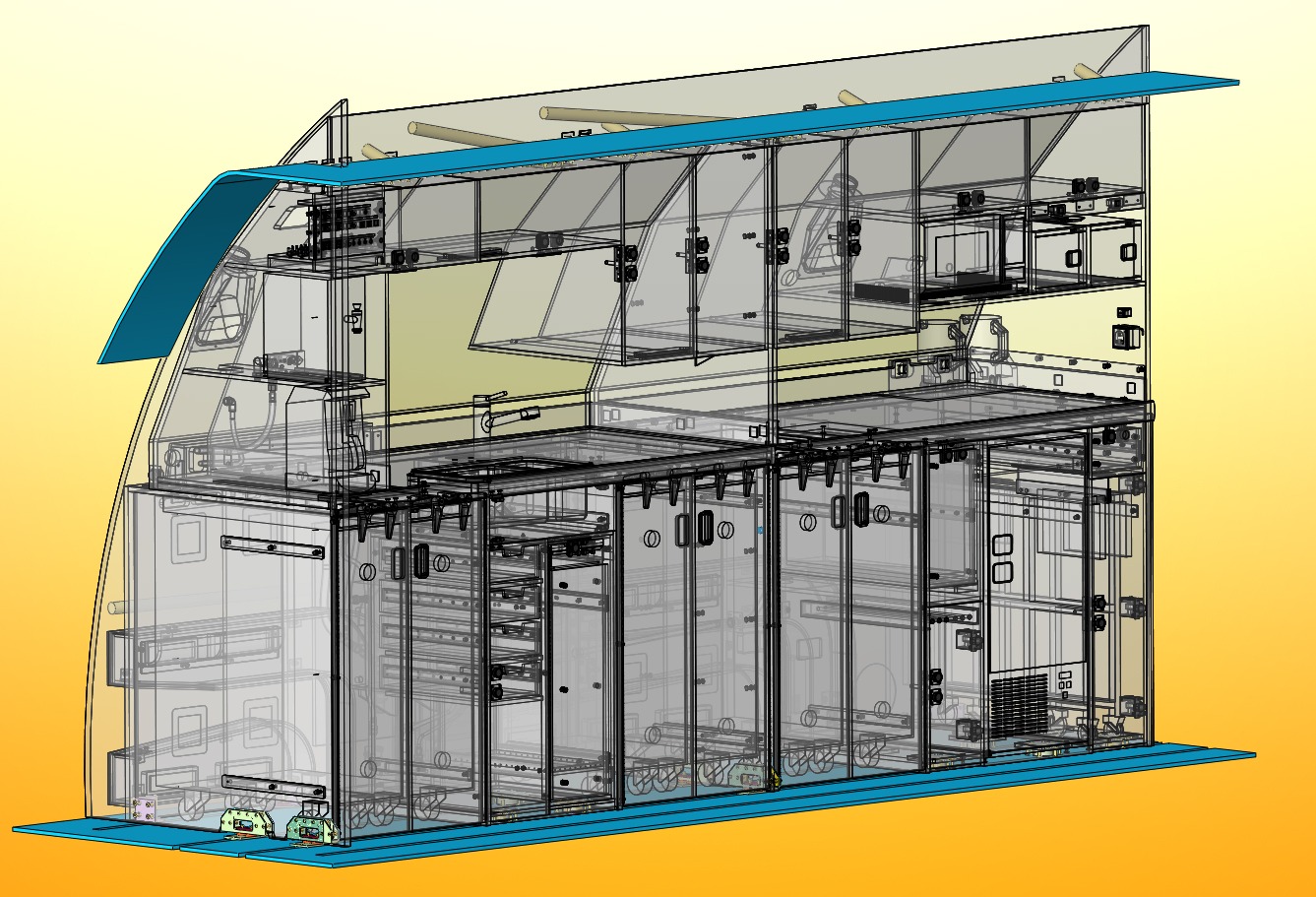
When you work within parts, it all get much easier and way more enjoyable. If only the large, more complex models would view as well as the smaller models. There’s nothing very surprising here from a graphical view. I was able to work quickly, change views, edit and zoom in very tight on sketches to pick them. However, when picking horizontal sketch lines, I had the same problems as previous GPU’s with offset selection occuring. A bit annoying, but only really happened when zoomed in extremely tight.

- Offset selection when zoomed in very, very tight. Otherwise working within sketches between views is very fast.

The Smack
I’ve always had pretty good result with NVIDIA Quadro cards, except for a few that have completely crapped out on me for no apparent reason. The FX 1800 was one I’ve been waiting to get my hands on. After using it for a few months I can tell the difference, but if you think it gets rid on any lag whatsoever you’d be mistaken. It’s easy to expect that every edge will be crisp and every rotation clean and breezy, but it’s still not there. Perhaps the combination of the CPU, GPU and software is to blame and it’s up to us to find the trifecta omnibus of graphical perfection. My one hope is that the SolidWorks developers and the GPU developers, whether they’re NVIDIA or another manufacturer, work closer together on the hardware/software interface that forgets what looks good in demos or benchmarks, but encapsulates any type of graphical work within the application to make design less frustrating.
Cheapest place to buy?
If you’re looking into upgrading or buying the Quadro FX 1800, the two cheapest places I’ve found it are here:
$374 – Amazon
$379 – Buy.com
Resources
SolidWorks Certified Graphics Card Drivers
NVIDIA Quadro GPU Line
NVidia Quadro FX 1800 product page
DisplayPorts at Wikipedia
DVI-I ports at Wikipedia
NVIDIA provided the FX 1800 for this review. No monies, peonies or ponies we’re exchanged in exchange for the review.