The computer mouse is a very familiar sight in offices around the world. You need a mouse to interact with your computer or laptop. While most laptops do have a mousepad as part of their design, this is usually barely fit for purpose, so many office workstations include a separate mouse and keyboard.
RollerMouse Red is unique. Even from its design, you can tell that it looks very different from an ordinary mouse. But is this unique design really a good answer to wrist and back pain when using your computer or laptop? This review explores some of the pros and cons of RollerMouse Red and whether it’s a good option for your desk setup.
What Sets RollerMouse Red Apart?
The first thing you likely notice from RollerMouse Red is the design. It doesn’t look like a mouse as you might know it.
Most mice fit in the hand, and you have to grab it and drag it around. If you’re using an ordinary mouse for a long time, you might notice shoulder and wrist strain. This is because you have to move the mouse manually, and you might be off-balance.
You might need a more ergonomic option.
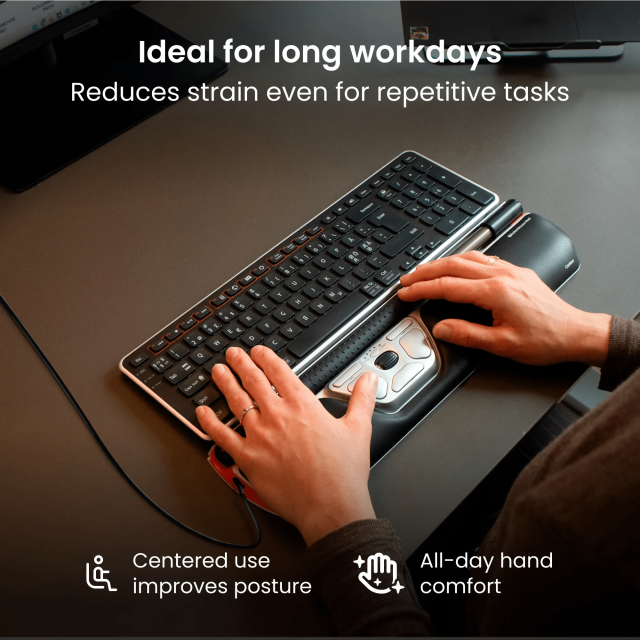
RollerMouse Red designed a new type of mouse from scratch. It sits below your keyboard in a more central position. You have the buttons you’re used to, and the ability to move your curser with the roller bar just like you were using an ordinary mouse.
It’s a completely different way of doing things, but is it best for office work?
Pros of RollerMouse Red
RollerMouse Red has a lot of very compelling benefits. Here are a few reasons to consider investing in this new mouse design for your desk.
Improved Posture While Using
One very common issue when working in an office environment is poor posture. If you’re sitting at a desk all day, you might find that you get back pain.
There are a few solutions to this. A common option is to use a standing desk, or at least a desk that can be adjusted so you can sit and stand as you need to. Changing your desk chair can also help.
Another common posture issue is that you might be off-balance because your mouse isn’t centered. RollerMouse Red solves this problem. It’s placed in the center of your desk, along with your keyboard, so everything is in one place. This is handy and, most importantly, helps your posture as you can sit or stand straight.
Superior Hand Comfort
The RollerMouse Red is also much more comfortable for your hands and wrists. You don’t have to grip anything or move anything around.
It can be tailored to your needs, with adjustable controls and wrist pads, so it’s comfortable for people who have different size wrists and hands. The wrist pad is made from memory foam, so you can have support for your wrists.
Even if you’re using your mouse for hours at a time, you can be comfortable with it.
Precision Use
Unlike an ordinary mouse, which needs to be moved around to use, you can control the RollerMouse Red with just your fingertips. As well as being more comfortable, this allows you to do everything you need to with complete precision.
Once you learn how to use this type of mouse, the very finely tuned controls can help you navigate your curser quickly and precisely. It’s easy to use and allows you to work more quickly.
Quality Construction, Recycled Materials
The RollerMouse Red was designed to last. It’s made with recycled aluminium and has a quality memory foam wrist wrest, all designed and built to high specifications. This makes it an eco-friendly option without feeling cheap. It has some good weight to it, so it’s stable to use, and looks and feels like the quality product it is.
Cons of RollerMouse Red
Not every product is perfect. The RollerMouse Red does have some downsides that you should consider.
High Price Tag
The first thing to take into consideration is the price. The RollerMouse Red is a quality product, and this is reflected in the price. It’s much more expensive than budget mice, but if you’re after a higher quality product that will last for years under a lot of wear and tear, you’ll want to invest more in your desk setup anyway.
While it’s worth paying more, this isn’t necessarily the most affordable option. However, if you aren’t sure about the investment, you can use the 30-day moneyback guarantee. So if you use the RollerMouse Red and don’t notice a difference in comfort in this time, you can send it back.
Non-Standard Design
While the unique design of the RollerMouse Red is part of its appeal, this can be off-putting to some people.
Most people are used to using an ordinary computer mouse or laptop mousepad, where you drag it around to use it. This is a very different way of controlling the curser. While it’s a relatively simple mouse, the change in control scheme might take a bit of time to get used to.
Once you’ve practiced using the RollerMouse Red for a while, you’ll likely find that it’s just as easy to use and you might even be able to work more quickly. But give yourself a little time to get used to the slightly different control scheme.
Final Thoughts
The RollerMouse Red was designed to manage a common pain point for office workers, which is literal pain and discomfort. We have more ergonomic desks, chairs, and keyboards, and a more ergonomic mouse was an obvious step in the right direction.
If you’re using a desk for hours at a time, even seemingly small changes can make a huge difference. So the RollerMouse Red can be worth it for people who work long hours and find that they have poor posture or have to manage wrist, arm, and shoulder pain from their mouse.