You get a STEP file from engineering. A perfect car body. A perfect engine. A perfect machine part. You open it in Blender, Maya, or Unreal — and it explodes into 2 million triangles, 47 broken shells, flipped normals, and a mesh that looks like it was chewed by a lawnmower.
Every 3D artist who has touched CAD knows that moment. CAD is perfect. Polygons are messy. And the bridge between them has been broken for 20 years.
Now Pilgway — the team behind 3DCoat — is trying to fix it with a brand-new, standalone tool called CADQuader.
80 Level’s report on CADQuader announced the beta: Pilgway’s new solution automatically transforms STEP and IGES files into quad meshes that are nearly ready for production. That is the headline. This article is the rest: what CAD actually is, why it breaks in polygon apps, what CADQuader does differently, how the Blender bridge works, what it cannot do yet, and the exact workflow to test it this week without wasting your 30-day beta.
The Verdict In 30 Seconds
| Question | Answer |
|---|---|
| What is CADQuader? | A new standalone tool from Pilgway that converts STEP / IGES CAD files into clean, quad-dominant polygon meshes. |
| Who is it for? | Game artists, viz artists, product / automotive / industrial designers, and anyone who gets CAD files and needs them in Blender, Unreal, Maya, or a renderer. |
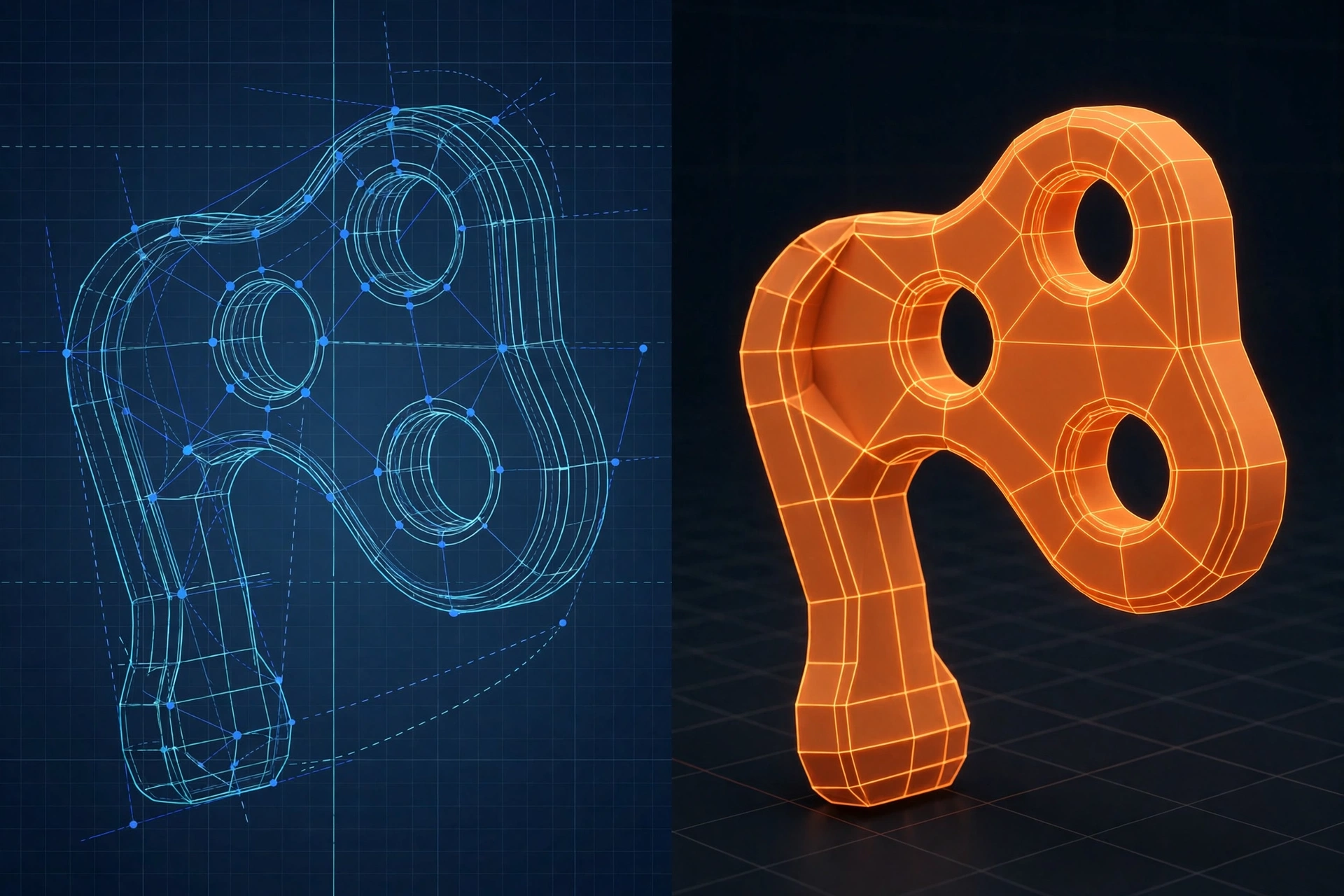
| What is the killer feature? | It does not just tessellate. It rebuilds topology: sharp edges preserved, edge loops around holes and circles, quads instead of triangle soup. |
| What is the catch? | It is beta. Native format is .quader. Export is OBJ for now. After 30 days full access, you can still view and generate meshes, but you need a licence to save / export. |
| Should you try it? | Yes — if you touch CAD files more than once a month. Download the beta, test it on your worst file, not your easiest one. |
Why CAD Files Break In Polygon Apps (The 2-Minute Lesson That Changes Everything)
If you do not understand this, you will never understand why CADQuader matters.
CAD Is Math. Polygons Are Lego.
CAD does not store a mesh. It stores surfaces. A cylinder in CAD is not 200 little flat faces. It is a mathematical definition: “a cylinder, radius 50mm, height 100mm, centred here.” That definition is called a NURBS surface — Non-Uniform Rational B-Spline — or more generally, a B-rep (boundary representation) solid.
Polygon apps do not speak NURBS. Blender, Unreal, Unity, Maya — they speak vertices, edges, and faces. Quads and triangles. Lego bricks.
So when you import CAD, something has to translate math into Lego. That translation is called tessellation. And most tessellators are dumb. They chop every curved surface into thousands of tiny triangles, with no regard for edge flow, no regard for sharp edges, and no regard for whether you will ever be able to UV, texture, rig, or subdivide that mesh again.
Why Triangles Are The Enemy (For Games And Subdiv)
Triangles are not evil. Games render triangles. Every quad becomes two triangles in the engine anyway. The problem is uncontrolled triangles.
- Subdivision breaks: Subdiv / Catmull-Clark wants quads. Triangles create pinching, stars, and weird shading. A triangle-soup car body will never subdivide cleanly.
- UVs break: Try unwrapping a 2-million-triangle fillet. You will get 2 million UV islands, or one island that looks like a melted spiderweb.
- Texturing breaks: Baking a normal map from a triangle-soup high-poly to a clean low-poly is a nightmare. Seams, gaps, and flipped normals everywhere.
- Animation breaks: Deforming a mesh with random triangles is like bending a bag of gravel. It creases where it should bend smoothly.
- Performance breaks: A CAD file that is 50 MB as STEP can become 2 GB as a tessellated mesh. Your viewport dies. Your game dies. Your deadline dies.
That is why artists do retopology — manually rebuilding a clean, low-poly, quad-based mesh over the high-poly CAD import. It is skilled, slow, and expensive. A single car can take days. A single machine assembly can take weeks. A single hero prop can eat a whole sprint.
CADQuader’s promise is simple and radical: what if the tessellator was smart enough to do retopology for you?
What CADQuader Actually Does (Not The Marketing Version)
CADQuader is not a converter. It is a rebuilder.
Here is what Pilgway says it does, translated into artist language:
1. It Reads STEP And IGES Like CAD, Not Like A Mesh
STEP (.step / .stp) is the modern standard for CAD exchange. IGES (.iges / .igs) is the older one — still everywhere in automotive, aerospace, and legacy parts. CADQuader imports both. That matters, because many Blender add-ons only handle STEP, or only handle one flavour of STEP, or choke on assemblies.
It reads the actual B-rep surfaces — planes, cylinders, cones, spheres, fillets, holes — not just a pre-tessellated STL hidden inside the file. That is the difference between “I know this is a cylinder” and “I see 10,000 triangles that happen to look like a cylinder.”
2. It Generates Quad Meshes, With Choices
You can choose from various generation methods based on the shape. In practice, that means: a flat machined plate gets a different meshing strategy than a curvy car fender, which gets a different strategy than a tiny bolt with 0.5mm fillets.
The goal is not “fewer polygons.” The goal is better polygons: quads where they matter, clean flow where the surface bends, and no wasted density on flat areas.
3. It Preserves Sharp Corners And Edges — Automatically
This is the feature that makes hard-surface artists cry happy tears.
Old tessellators smooth everything. A 90-degree machined edge becomes a soft, mushy blob. A crisp panel gap becomes a smeared gradient. You then spend hours re-marking sharp edges by hand in Blender, or baking a normal map that lies about the shape.
CADQuader automatically detects and preserves sharp corners and edges. It knows, from the CAD data, “this is a real edge, keep it sharp” vs “this is a smooth fillet, keep it smooth.” That one decision saves hours of manual cleanup and makes the mesh actually usable for baking and subdivision.
4. It Creates Edge Loops Around Circular Features
Holes. Bolts. Cylinders. Pipes. Wheels. The bane of every CAD import.
Old tessellators turn a circular hole into a jagged starburst of triangles. CADQuader creates edge loops around circular features — concentric rings that follow the hole. That means you can select the hole, bevel it, add a bolt, or UV it, without fighting the topology. It also means reflections on a car body will look right, because the edge flow follows the shape.
5. It Has A Real Blender Bridge (Not Just Export OBJ And Pray)
This is where CADQuader gets interesting for game artists.
A dedicated Blender bridge lets you send meshes generated in CADQuader directly to Blender, then return the edited meshes to CADQuader. During this transfer, polygons, placement, scale, UVs, normals, and sharp edges are preserved.
Read that again: UVs and sharp edges survive the round trip. That is not normal. Most CAD → Blender workflows are one-way: you export OBJ, you lose everything, you start over in Blender, and if engineering changes the CAD file, you start over again.
CADQuader’s bridge is meant to be a loop: CAD → CADQuader (clean quads) → Blender (UV, texture, tweak, retopo, bake) → back to CADQuader (re-mesh, check, export). For production pipelines where the CAD file changes every week, that loop is the whole game.
6. It Has Its Own Format, And OBJ Export (For Now)
CADQuader uses its own native .quader file format, and supports exporting models in OBJ format. That is beta-simple. OBJ is old, but it is universal: Blender, Maya, Houdini, ZBrush, Substance, Unreal, Unity — everything reads OBJ.
What it does not yet have (as of beta) is FBX, glTF, USD, or Alembic export. For games, that matters: you will likely go CADQuader → Blender → FBX / glTF → Engine. That is fine, but it is an extra step. Expect Pilgway to add more formats if the beta gets traction. If you need FBX today, the Blender bridge is your path.
The Workflow: From STEP File To Game-Ready Mesh In 6 Steps
Here is the workflow the Pilgway team is designing for. Test it exactly like this, and you will learn in 30 minutes whether CADQuader is for you.
- Prepare in CAD (5 minutes, saves 5 hours). In SolidWorks / Fusion / Rhino / CATIA / Inventor, delete construction geometry, sketches, hidden parts, and duplicate solids. Export as STEP AP214 or AP242, not IGES if you can avoid it. STEP preserves names, assemblies, and colours better. Check units: mm vs cm vs m is the #1 reason CAD imports come in 1000x too big.
- Import into CADQuader. Open the STEP / IGES. Do not touch anything yet. Look at the part list. Are all parts there? Are names intact? Is scale right? If the import is wrong here, no meshing setting will fix it.
- Pick a generation method for the shape. Start with the default / auto method for a first pass. For a flat machined part, try a coarser, more planar method. For a curvy car panel, try a method that prioritises smooth flow. For a tiny filleted bolt, try a method that preserves small features. You are not “picking quality.” You are picking intent.
- Generate the quad mesh. Check 3 things. A) Sharp edges: are machined edges still crisp, not melted? B) Holes: do circular holes have clean edge loops, not starbursts? C) Density: are flat areas low-poly, curved areas higher-poly, tiny fillets not exploding the count? If one of those fails, change method, not just “more polygons.”
- Send to Blender via the bridge. In CADQuader, send to Blender. In Blender, check scale, normals, UVs, and sharp edges. Do your UVs, texture, bake, or manual retopo tweaks here. This is where Blender is better than any CAD tool.
- Send back, re-export, and bake. Return the edited mesh to CADQuader if you need to re-mesh or check against the original CAD. Export OBJ for your renderer, or FBX / glTF from Blender for your engine. Bake your high-to-low normal map in Blender, Marmoset, or Substance. Done.
Pro tip: Do not test CADQuader on a cube. A cube will look perfect in any tool. Test it on your worst file: a car wheel with 12 bolt holes, a filleted bracket with 0.5mm chamfers, a cast engine block with organic curves and sharp ribs. The worst file tells you the truth in 10 minutes.
How CADQuader Compares To The Old Ways (Honest, Not Hype)
| Method | What You Get | What You Lose | Best For |
|---|---|---|---|
| Blender STEP Importer / StepForge / CAD Importer add-ons | STEP inside Blender, no separate app. Fast for viz. | Usually triangle tessellation, not clean quads. Manual cleanup still needed for subdiv / game. | Quick viz, product shots, layout, blocking. |
| MoI3D (Moment of Inspiration) | Beautiful NURBS-to-mesh export, excellent mesher, n-gon / quad control. | It is a NURBS modeller, not a retopo tool. No auto quad retopo for CAD, no Blender round-trip bridge. | Designers who model in NURBS and need clean render meshes. |
| Rhino / Fusion / SolidWorks → OBJ / FBX | Direct export from your CAD app, no new tool. | Triangle soup, no edge flow, no sharp preservation, huge files. | One-off renders, 3D printing, reference. |
| Manual Retopo in 3DCoat / Blender / Maya | Perfect topology, perfect edge flow, perfect for hero assets. | Days of work. Does not scale to assemblies with 500 parts. | Hero game assets, film, close-up props. |
| Auto Retopo (ZRemesher, Quad Remesher, Instant Meshes) | Fast quad retopo from a high-poly mesh. | It retopos the mesh, not the CAD. It does not know what was a sharp edge vs a fillet. It can smooth away intent. | Organic sculpts, scans, already-meshed models. |
| CADQuader (Beta) | Quad mesh from CAD data itself, sharp edges + hole loops preserved, Blender bridge. | Beta: OBJ only, .quader native, no FBX / glTF yet, pricing unknown, long-term stability unknown. | CAD → game / viz pipelines, hard-surface, automotive, product, industrial. |
Notice the pattern: every old method either loses CAD intent, or takes forever. CADQuader’s bet is that you can keep CAD intent and get clean quads, automatically, because it starts from the CAD surfaces, not from a dead mesh.
That bet is not proven yet. Beta is beta. But it is the right bet.
For comparison, Blender’s StepForge extension reads and writes STEP files directly inside Blender using pure Python and NumPy, with real B-rep import for planes, cylinders, cones, spheres, tori and NURBS surfaces — not just facets. That is great for getting CAD into Blender. CADQuader is trying to solve the next step: getting CAD into clean quads that you can actually use.
And MoI3D has long been praised for its NURBS-to-polygon mesher, with controls for angle, “Avoid smaller than” for tiny fillets, and n-gon output that keeps flat faces as single polygons. MoI is a modeller. CADQuader is a converter / retopo tool. They are complementary, not competitors — MoI makes NURBS, CADQuader turns NURBS into quads.
## The Beta: What You Actually Get (And What To Do Before Your 30 Days Run Out)
Here is the deal, as announced:
- Free to download with quick registration. Download CADQuader from the official site cad2quads.xyz (also listed as cadquader.com in newer builds).
- 30 days full access, including saving and exporting. That is your real trial. Use it.
- After 30 days, you can still view models and generate meshes, but you need a licence to save or export. In other words, the viewer stays free, the production tool does not. Pilgway has not announced final pricing yet — expect it to be separate from 3DCoat, or as an add-on, and expect it to be aimed at studios, not hobbyists.
- It is in active development. The team is inviting feedback. The Polycount thread for CADQuader says the beta runs with full functionality for two months without a licence in earlier builds, and newer 2026.10 / 2026.17 builds focus on mesh quality, relax, and improved quad meshing. Beta timelines and terms change fast — check the download page, not a blog post from last month.
How to use your beta wisely:
- Day 1: Import your 3 worst files. Not your best. Your worst. Record time, polycount, and how many manual fixes you needed.
- Day 2-3: Test the Blender bridge round-trip. Does it preserve UVs? Sharp edges? Scale? If it breaks, report it — Pilgway is actively fixing bridge bugs in beta.
- Day 4-7: Test a full asset: CAD → CADQuader → Blender → Substance / Marmoset → Unreal / Unity. Bake a normal map. Does it bake clean? Does the low-poly shade clean? That is the real test.
- Day 8-14: Test an assembly, not a single part. 50 parts. 500 parts. Does it handle names, hierarchy, and instancing? Or does it explode?
- Before Day 30: Export everything you need. Save your .quader files. Screenshot your settings. If you buy a licence later, you will want those settings.
Do not test CADQuader on a weekend and then decide it is “cool.” Test it on a real deadline, on a real file, with a real engine target. That is the only test that matters.
What CADQuader Cannot Do (Yet) — And Why That Matters
An experienced writer does not just cheerlead a beta. Here is the honest scorecard.
| What It Does Well | What It Has Not Proven / Cannot Do Yet |
|---|---|
| Quad mesh from STEP / IGES, with CAD intent preserved | No FBX / glTF / USD export yet. You need Blender for engine export. |
| Sharp edge preservation, hole edge loops | No parametric round-trip to CAD. You cannot send a Blender edit back as a parametric CAD solid. It is mesh → mesh, not mesh → NURBS. |
| Blender bridge with UV / normal / sharp preservation | Assembly handling unknown. 500-part assemblies, instancing, and part names at scale are the hardest test, and beta users have not published results yet. |
| Multiple meshing methods for different shapes | No published benchmarks. No polycount vs quality vs time charts, no comparison to Quad Remesher / ZRemesher on the same file. You have to benchmark it yourself. |
| Free beta, fast iteration from Pilgway | No pricing, no roadmap. Will it be a separate purchase? A 3DCoat add-on? A subscription? Pilgway has not said. |
None of those are deal-breakers for a beta. They are warnings: do not rebuild your whole pipeline around CADQuader on Day 1. Use it as a parallel path. Run your old workflow and CADQuader side by side on the same file, and compare time, polycount, bake quality, and shading. If CADQuader wins, adopt it. If it does not, keep your old workflow and check back in 3 months.
The Real Workflow Pros Use (CAD → Game, Without The Tears)
Whether you use CADQuader or not, this is the pipeline that actually works in production:
- High-poly in CADQuader (or your CAD app). This is your source of truth. Keep it clean, keep it watertight, keep it at the right scale.
- Low-poly / retopo in CADQuader or 3DCoat. This is where CADQuader shines: a quad low-poly that follows the CAD shape, with sharp edges and hole loops intact.
- UV in Blender / RizomUV / 3DCoat. Unwrap the low-poly. Keep seams on sharp edges, not on smooth curved surfaces. That is why sharp preservation matters — your UV seams go where the CAD already has a seam.
- Bake in Marmoset / Substance / Blender. Bake normal, AO, curvature, and position from high to low. If your bake has wavy lines, your low-poly topology is wrong, not your bake settings.
- Texture in Substance / 3DCoat. 3DCoat’s texture painting is why many artists love it — you can paint directly on the mesh, with PBR, and see it in real time.
- Export to Engine. FBX / glTF from Blender to Unreal / Unity. Set up LODs: a high-poly for close-ups, a medium for gameplay, a low for distance. A car that is 200k tris in-game does not need to be 2M tris in CAD.
CADQuader does not replace that pipeline. It replaces the worst step in it: the manual retopo that used to take days. If it does that one step well, it is worth every penny.
Your Action Plan Today
- If you get CAD files weekly: Download the CADQuader beta today. Test it on your worst file. Time it. Compare it to your old workflow. Report bugs — Pilgway is listening in beta, and beta feedback shapes the final tool.
- If you get CAD files monthly: Try the Blender STEP importers first (StepForge, STEP Importer, CAD Importer). If they give you triangle soup you cannot use, then try CADQuader.
- If you model in NURBS yourself: Try MoI3D for meshing, and CADQuader for retopo. They solve different problems, and they work well together.
- If you are a studio lead: Do not buy yet. Run a 2-week bake-off: same file, CADQuader vs your current pipeline, same artist, same deadline. Measure time, polycount, bake errors, and artist happiness. That is your buying decision.
- If you are a student / hobbyist: Learn the concepts, not the tool. NURBS vs polygons, tessellation, sharp edges, edge loops, retopo, baking. Those concepts will outlive CADQuader, 3DCoat, and Blender. The tool is just the current best way to do them.
The Real Takeaway: CAD Was Never The Problem. The Translation Was.
For 20 years, we blamed CAD for being “too heavy” or “too precise” or “not for games.” That was never true.
CAD was perfect. The translation was broken. We were taking a perfect mathematical surface, chopping it into random triangles, and then spending days rebuilding it by hand — and calling that “the pipeline.”
CADQuader is the first tool in a long time that tries to translate CAD intelligently — to read the intent, not just the geometry, and to give you quads that respect sharp edges, holes, and flow, instead of triangles that respect nothing.
It is beta. It is incomplete. It might fail on your file. It might change pricing. It might get FBX export next month, or it might not.
But the idea is right. And if Pilgway gets it right — if CAD → quad mesh becomes a 10-minute job instead of a 10-day job — then every car, every machine, every product, every hard-surface game asset gets faster, cheaper, and better. And every artist who has ever cried over a 2-million-triangle STEP import gets their weekend back.
That is worth testing.
Have you tried CADQuader on a real file — a car, a machine, a product? Tell us in the comments: what file, what polycount, what generation method, and how many manual fixes did you still need? Your worst file is the best benchmark.