

The SolidWorks BOM (Bill of Material) is actually pretty cool. It’s easy to layout and set up Custom Properties for your standard material list. Along with all those nice features, you can actually do some additional customization on a SolidWorks BOM you hadn’t thought of. One of these things is exactly what J.D. Myers from Applied Heat Recovery, LLC asked me about in a recent email.
How can I add a prefix to the item number field on a BOM?
Good question JD. The first thing I’ve seen some people do is edit the table fields and add it manually. That is a lot of pain. Here’s how you can automate it in your BOM.
- Select the Column with the item numbers.
- Select Column Properties in the Property Manager.
- In the Column Properties section select equation button and enter the following: =”C”‘ITEM NO.’
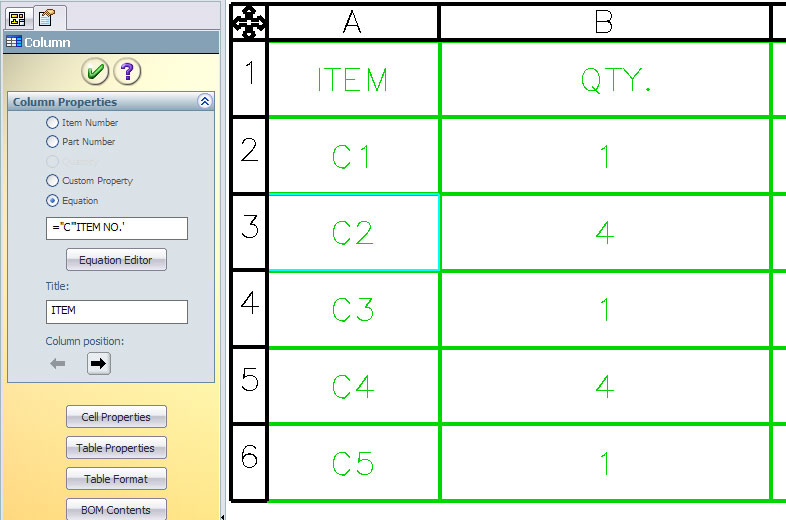
Whatever you put between the two double quotes, the letter ‘C’ in this case, will show up in front of the number.
There are four important things to remember.
- Text goes in double quotes – ex. “TEXT”
- Column Properties go in single quotes – ex. ‘ITEM NO.’
- Custom Properties go in fwd quotes – ex. `SW-File Name`
- Using the Equation Editor in the Column Properties makes the three above easier.
What about for a Mass Custom Property?
If you have a mass Custom Property set up in File, Properties… on the Custom Tab named MASS, here would be an example of how you could use it in your BOM.
=`MASS`” lbs”
Now, if you were able to do this, you can set each column to use whatever Custom Property or interesting phrases that you like. Then you can right click on the BOM, select Save As… and save it as a BOM template to use next time.



